Built for the Gravity Forms Ecosystem

Your Forms.

Now a Visual Pipeline.

Stop hunting through entry lists. Gravity Pipeline transforms your Gravity Forms data into a Kanban board — drag, assign, and close deals directly from your WordPress dashboard.

✓ Free forever core  ·  ✓ No credit card for free plan  ·  ✓ Cancel Pro anytime
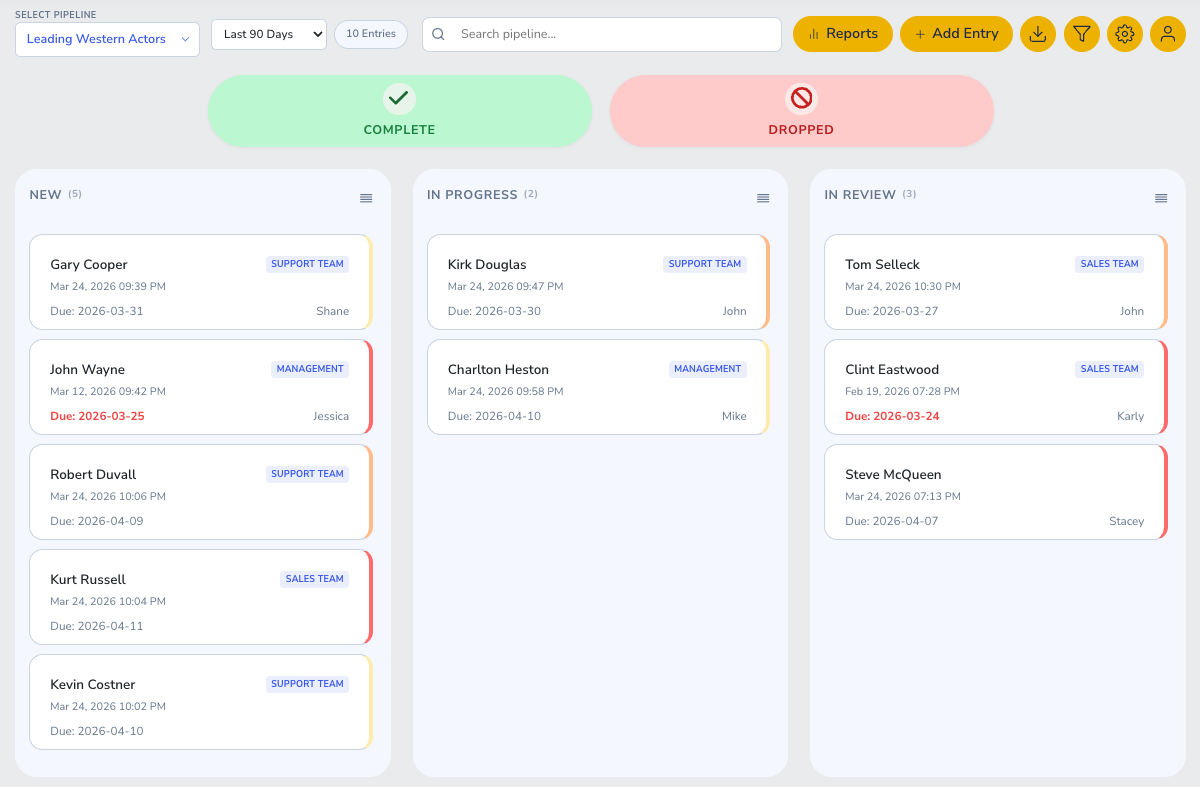
wp-admin › Gravity Pipeline
Gravity Pipeline Kanban Board
Powered by Gravity Forms · WP REST API · WooCommerce · Stripe
Features

Everything Your Team Needs

From solo freelancers to large agencies — Gravity Pipeline scales with your workflow.

Free

Free Core

Everything you need to get started — no credit card required.

  • Unlimited Kanban Boards
  • Drag & Drop Entry Management
  • Field Mapping (Any GF Field)
  • Multi-Board Support
  • WordPress.org Compliant
  • Zero External Dependencies
Download Free
Recommended Pro

Pro

Unlock the full power of Gravity Pipeline for your team.

  • Everything in Free
  • Role-Based Access Control
  • User & Group Assignments
  • Manager Dashboard View
  • Inline Card Editing
  • GF Notification Triggers
  • Multi-Site License
  • Priority Support
Get Pro — from $9/mo
🔲

Visual Kanban

See all your Gravity Forms entries as drag-and-drop cards across customizable pipeline stages.

↔️

Drag & Drop

Move entries between stages with a single drag. Status updates fire automatically.

🔐

Role-Based AccessPRO

Managers see team pipelines. Users see only their own cards. Fully configurable.

🗺️

Field Mapping

Map any Gravity Forms field to pipeline card properties — title, status, assignee.

🔔

GF NotificationsPRO

Trigger Gravity Forms notification emails when a card changes stage or gets assigned.

📋

Multi-Board

Create unlimited pipelines — one per form, department, or workflow. Each independently configured.

Pricing

Simple, Honest Pricing

Start free. Upgrade when your team needs more. Cancel anytime.

FREE CORE
$0 / mo
or $0/yr — save 2 months

Everything you need to get started.

1 site license
  • ✓ Unlimited Kanban Boards
  • ✓ Drag & Drop
  • ✓ Field Mapping
  • ✓ Multi-Board Support
  • ✓ WordPress.org Compliant
Download Free
STARTER
$9 / mo
or $79/yr — save 2 months

Perfect for freelancers & solo WP sites.

1 site license
  • ✓ Everything in Free
  • ✓ Role-Based Access Control
  • ✓ Inline Assignment Editing
  • ✓ GF Notification Triggers
  • ✓ 1-Site License
  • ✓ Email Support
Get Starter
Most Popular
PRO
$19 / mo
or $149/yr — save 2 months

For agencies managing multiple client sites.

3 site licenses
  • ✓ Everything in Starter
  • ✓ Group Assignments
  • ✓ Manager Dashboard
  • ✓ Multi-Site License (3 sites)
  • ✓ Priority Support
  • ✓ Early Feature Access
Get Pro
ENTERPRISE
$49 / mo
or $299/yr — save 2 months

Full-scale teams with large-volume pipelines.

10 site licenses
  • ✓ Everything in Pro
  • ✓ 10-Site License
  • ✓ Full REST API Access
  • ✓ License Management Portal
  • ✓ Dedicated Support
  • ✓ Custom Feature Requests
Get Enterprise

All Pro plans billed via goat-getter.com. Stripe-secured checkout. 30-day money-back guarantee.

How-To Docs

Get Up and Running Fast

Step-by-step guides for both Free and Pro versions.

📦 Free Version

01 — Install

Installing Gravity Pipeline

Download the free plugin from WordPress.org or GitHub and upload via Plugins → Add New → Upload Plugin. Activate it.

02 — Create a Board

Create Your First Pipeline Board

Go to Pipeline → Boards → Add New. Give it a name and select the Gravity Form it should pull from.

03 — Map Fields

Field Mapping Setup

In the board settings, map your GF fields to pipeline properties: Title, Status column, Assignee.

04 — Go Live

Launch Your Pipeline

Save the board. Go to Pipeline → View Boards to see your entries flowing as cards.

⚡ Pro Version

01 — License

Activate Pro License

After purchase, go to Pipeline → License, enter your key from goat-getter.com/my-account, and click Activate.

02 — Role Access

Setting Up Role-Based Access

Go to Pipeline → Settings → Access Control. Assign roles: Admin (full), Manager (team), User (own cards).

03 — Groups

User Groups & Team Assignments

Create groups under Pipeline → Groups. Add users to groups and assign cards to entire teams at once.

04 — Notifications

GF Notification Triggers

In board settings, enable Notification Triggers. Map pipeline stage changes to Gravity Forms notifications.

The Ecosystem

More Plugins Coming Soon

Gravity Pipeline is just the beginning. A full suite of tools is on the way.

📊
Coming Soon

GP Reports

Beautiful analytics dashboards for your Gravity Forms pipelines — conversion rates, time-to-close, stage velocity.

💬
Coming Soon

GP Communication

Threaded comments, @mentions, and email notifications directly on pipeline cards.

Coming Soon

GP Automation

Set rules to auto-assign, auto-move, and auto-notify based on field values and time triggers.

FAQ

Common Questions

Yes — Gravity Pipeline connects to any Gravity Forms form on your site. You choose which form to map to each pipeline board.
The Free version gives you unlimited boards, drag-and-drop, and field mapping. Pro adds role-based access control, user & group assignments, manager dashboards, GF notification triggers, and multi-site licensing.
Yes! Starter covers 1 site, Pro covers 3 sites, and Enterprise covers 10 sites. You can upgrade at any time.
Both are available. Annual billing saves you roughly 2 months of cost per year. You manage your subscription at goat-getter.com/my-account.
Yes — we offer a 30-day money-back guarantee on all paid plans. No questions asked.
No — Gravity Pipeline (free and Pro) is standalone and does not require WooCommerce. WooCommerce is only used on goat-getter.com to handle your subscription and license management.

Ready to See Your Pipeline?

Start free today. Upgrade to Pro when you need team features.